MarkdownAtlas: A Privacy-First Markdown Viewer for macOS
MarkdownAtlas: A Privacy-First Markdown Viewer for macOS
I recently built MarkdownAtlas, a markdown viewer for macOS that prioritizes privacy above everything else. No telemetry, no internet connection, no tracking—just you and your markdown files.
The Problem
Most modern markdown viewers come with baggage:
- Electron apps that ship an entire Chrome browser just to display text
- Cloud-syncing features you didn’t ask for, sending your private notes to someone else’s servers
- Telemetry and analytics tracking every action you take
- Dozens of dependencies creating supply chain security risks
- Subscription models for what should be a simple tool
I wanted something different: a tool I could trust, that respects my privacy, and that I can actually audit.
The Solution
MarkdownAtlas is built from scratch using native macOS technologies:
- Pure Objective-C with Cocoa/AppKit frameworks
- Zero dependencies - no npm packages, no third-party libraries
- Single file architecture - the entire app is ~1000 lines of code in
main.m - Completely offline - never makes a network request
- No telemetry - doesn’t track, collect, or send any data
Privacy by Design
Privacy isn’t a feature you bolt on—it’s a fundamental architectural choice. Here’s how MarkdownAtlas achieves it:
-
No network code - The app literally has zero networking code. It can’t phone home because that functionality doesn’t exist.
-
Auditable - At under 1000 lines of code, you can actually read and understand the entire codebase in an afternoon. No hidden surprises.
-
Zero dependencies - Every dependency is a trust boundary. By having none, there’s no supply chain to compromise.
-
Native only - Uses only Apple’s built-in frameworks that ship with macOS. No external binaries, no JavaScript runtime, no bundled interpreters.
Technical Approach
Building a markdown viewer in under 1000 lines required some careful decisions:
Rendering Engine
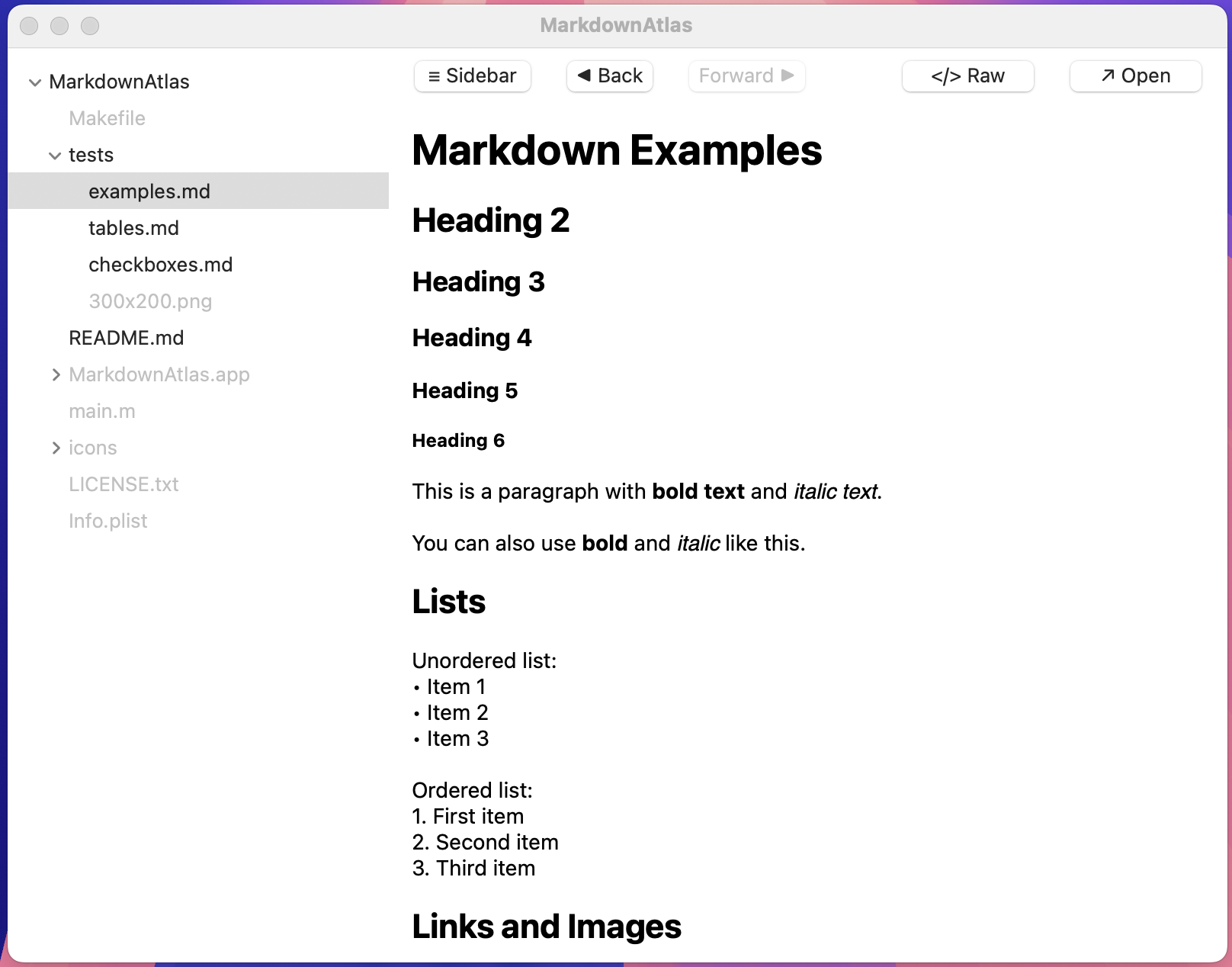
Instead of embedding a web view or markdown library, I built a simple parser using NSAttributedString. It handles:
- Headers (H1-H6)
- Bold, italic, and
codeformatting - Links (both HTTP and local file paths)
- Checkboxes with interactive toggling
- Tables with proper Unicode support
- Code blocks with syntax highlighting
The rendering happens in ~200 lines of code, converting markdown text directly to native macOS rich text.
File Navigation
The sidebar uses NSOutlineView for hierarchical folder browsing. I initially tried NSTableView but ran into issues with file hierarchy. Switching to NSOutlineView gave native tree visualization for free.
State Management
Navigation history is managed with simple arrays:
@property (strong) NSMutableArray *navigationHistory;
@property (strong) NSMutableArray *scrollPositions;
@property NSInteger navigationIndex;
Back/forward buttons work just like a browser, preserving scroll position when you navigate back to a previously viewed file.
Icon Generation
Even the icon generation avoids dependencies. Instead of Python + Pillow (my original approach), I use only macOS built-in tools:
# icons/generate_icon.sh
sips -s format png -z 1024 1024 icon.svg --out icon_1024.png
iconutil -c icns AppIcon.iconset
The SVG icon features a folder with tree structure lines and “MD” text, clearly communicating what the app does.
Why Native Matters
Using native APIs instead of cross-platform frameworks gave me:
Performance: The app launches instantly and renders markdown in real-time as you type. No JavaScript overhead, no electron bloat.
Size: The compiled binary is ~100KB. An equivalent Electron app would be 100MB+.
Trust: Apple’s frameworks are audited, sandboxed, and come with macOS. No third-party code to trust.
Integration: Native macOS look and feel. The app respects system preferences for dark mode, fonts, and window management.
The Zero Dependencies Philosophy
Every dependency is a liability:
- Security risk - Any package can be compromised (see: left-pad, event-stream, colors.js)
- Maintenance burden - Dependencies update, break, and get deprecated
- Privacy concern - You’re trusting the package author and their entire dependency tree
- Bloat - Most packages bring transitive dependencies you don’t need
By staying at zero dependencies, MarkdownAtlas eliminates all of these concerns. The only code that runs is code I wrote or that ships with macOS.
Challenges
Unicode in Tables
The hardest bug was table rendering mangling Unicode characters. Stars and checkmarks displayed as ✓è,≠è garbage.
The problem? Using UTF8String with C-style formatting:
// ❌ Broken - corrupts Unicode
[rowText appendFormat:@"%-*s", (int)width, [cell UTF8String]];

// ✅ Fixed - preserves Unicode
[rowText appendString:cell];
for (NSInteger p = 0; p < padding; p++) {
    [rowText appendString:@" "];
}
Code Block Backgrounds
Initially only the ``` fence lines had gray backgrounds, not the content between them. Fixed by adding state tracking:
BOOL inCodeBlock = NO;
// ...
if ([line hasPrefix:@"```"]) {
    inCodeBlock = !inCodeBlock;
} else if (inCodeBlock) {
    // Apply code styling
}
macOS Gatekeeper
Since I’m not paying Apple $99/year for a developer certificate, users see scary warnings when first opening the app. The solution is clear documentation:
- Right-click → Open (bypasses Gatekeeper)
- Or run:
xattr -cr MarkdownAtlas.app
I’d rather document this than compromise on privacy or pay Apple’s gatekeeping tax.
Build System
The entire build is a simple Makefile:
CC = gcc
CFLAGS = -std=c2x -Wall -Wextra
FRAMEWORKS = -framework Cocoa

build: $(APP_BUNDLE)
    $(CC) $(CFLAGS) $(FRAMEWORKS) -o $@ main.m
No webpack, no babel, no package.json with 500 dependencies. Just make and you’re done.
What I Learned
-
Native development is underrated - The barrier to entry is higher, but the payoff in performance, size, and trust is massive.
-
Constraints breed creativity - The “under 1000 lines” goal forced me to simplify and avoid over-engineering.
-
Privacy by default is possible - You don’t need telemetry. You don’t need analytics. These are choices, not requirements.
-
Documentation matters - Because the app is unusual (native, unsigned, minimal), good documentation is critical for user trust.
-
Simple tools can be powerful - Markdown viewing doesn’t need AI, cloud sync, or collaboration features. Sometimes a simple, focused tool is exactly what you need.
Open Source
MarkdownAtlas is fully open source on GitHub: stan-kondrat/MarkdownAtlas
The entire codebase is auditable. No minified JavaScript, no obfuscated binaries—just readable Objective-C that does exactly what it says.
Future
I’m keeping the scope intentionally limited. No plans for:
- Cloud features
- Collaboration
- AI integration
- Cross-platform support
- Premium tiers
The goal is a tool that does one thing well and respects your privacy. Adding features would compromise that mission.
Try It
If you’re on macOS and care about privacy, give it a try:
git clone https://github.com/stan-kondrat/MarkdownAtlas.git
cd MarkdownAtlas
make
open build/MarkdownAtlas.app
Or download a release from GitHub and remember to bypass Gatekeeper on first run.
In a world where everything phones home, collects telemetry, and mines your data, it’s refreshing to build something that simply doesn’t. MarkdownAtlas is my small contribution to a more privacy-respecting future.
Your files are yours. Your data is yours. Software should respect that.